
This article was published on Feb. 28 at Webanalists.com
November 24, 2025
Will AI make us smarter or dumber? The insights of Klöpping, Scherder and Online Dialogue
Reflection on Klöpping × Scherder by Simon Buil (Data Analyst at Online Dialogue)

The Google Analytics API plus the Google sheets add on is my favorite tool for Google Analytics. The automation of standard reports and the ability to write out segments instead of having to click 15 things definitely saves me a few hours a week. I previously wrote an article about the automate your test analyses.
At the end of January, the API received an update and shortly thereafter the Google Sheets add on. In the update, a few things have changed when setting up reports. In addition, the next (much needed) feature was added: Resource Quotas. This allows you to make unsampled data requests. Unfortunately, so far this is only available to Google Analytics 360 users.
In my experience, in a Google Analytics 360 accounts if you do an analysis through the GA website very little sampling occurs. If you do the same analyses with the API + sheets combination sampling almost always occurs.
In setting up the reports, some input fields have changed and two new fields have been added. I have listed the changes for convenience:
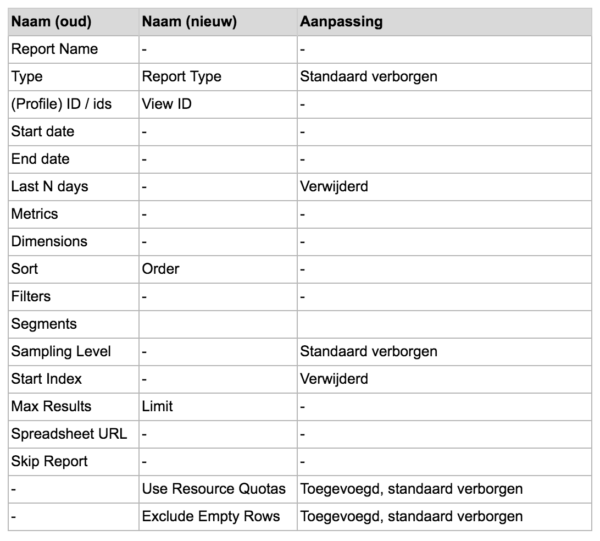
This will filter out dimensions within the results with the value 0 from the result. This is as useful if you don't want to retrieve results without values.
This new feature gives Google Analytics 360 users the ability to request unsampled data from Google Analytics. There are only a limited number of requests you can make per day. Per day and per property, there are 100,000 “resources” to consume. A simple request like homepage visitor numbers takes 50 resources. A complex request where you only look at new visitors who clicked a certain button and then made a purchase costs 500 resources. This way, on a day where you have to analyze a lot of complicated things, you can still do 200 unsampled data requests.
This is only relevant for power users who retrieve the values of specific fields in the data reports. Due to adjustments, the sampling percentage is one row higher and “number of visits/percentage of visits this report is based on” has been removed. This has been replaced with Query Cost of the data request, where applicable.
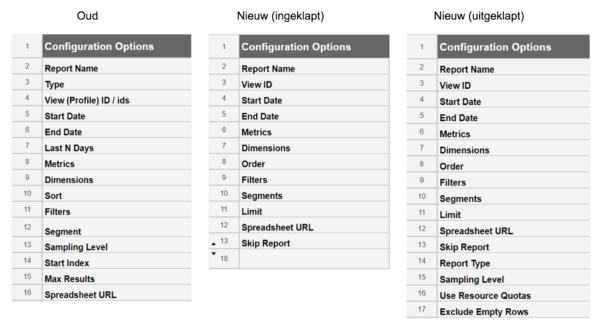
I am very excited about the update due to the ability to request unsampled data. In the past with the Sheet add on API I had to take all sorts of detours to get unsampled data or still analyze it in GA itself but this is now a thing of the past. Unfortunately, this is only available to GA360 users and I expect it to remain so.
Other than that, little has changed and the other changes will only affect power users. Because certain cell names in existing reports have been removed or changed, all kinds of references no longer work. I don't know if others have also experienced this, but with some existing reports I constantly got errors and could only solve this by deleting all data printouts.
I would love to hear your experiences!
This article was published on Feb. 28 at Webanalists.com
 Nederlands Nederlands
 English