March 5, 2026
Why experimentation is becoming an operating model for smart organizations
A conversation with Valentin Radu, founder of Omniconvert, on experimentation as an operating model, AI and sustainable digital growth. Read more

We are looking for a data analyst! Check the job posting.

Increasingly, organizations are experimenting and striving to create a validation-driven culture within companies. For example, at Online Dialogue, in collaboration with our clients, we regularly run A/B testing. Running A/B tests also has its pitfalls. One of these pitfalls is the so-called flicker effect. This effect can affect behavior and test results. In this blog, we explain what the flicker effect is and how you can solve it.
With the flicker effect, also called FOOC (Flash of Original Content), visitors are first shown the original and then the modifications are applied making it visually perceptible.
Technically, in client-side A/B testing, you always have a small interval. In an ideal situation, this is so short that it is barely visible to the human brain. As soon as this interval becomes longer and is perceived as annoying or clearly visible, there is a Flicker effect. Particularly if it is clearly visible that an adjustment is made after loading a page.
Causing a flicker effect is determined by 3 factors:
When a page, the test tool, or the assets used (images, fonts) load slowly, this will be more noticeable than when it happens within a few milliseconds. This can happen because the files are very large or when the user has a slow connection, such as with a bad connection.
When an element is at the top of the page it is the first to be perceived without user interaction, this makes it more likely than when it is “below the fold” or at the very bottom of the page. This is because it takes longer for the user to visually perceive the element in question.
When the visual size increases, the more likely it is to be perceived. It's a big difference whether you're reloading a hero image or a text adjustment.
Google Tag Manager is a great tool for loading scripts onto the website, but in the case of A/B testing, we don't recommend it.
In fact, Google Tag Manager has to be loaded first. This script is a very large script and only once it has finished loading does the rest begin to load. The scripts coming from Google Tag Manager are loaded by GTM in a random order, which can mean that the A/B testing tool loads very late.
Therefore, it is advisable to always place A/B testing tool scripts directly in your code.
The higher the script is in the code, the earlier the script will load. We therefore recommend putting the script in the “head” tag of the html, so that the script starts loading even before the content of the page becomes visible.
However, this may cause a small problem, namely that the elements are not yet available on the page as soon as the script loads and you receive an error message. In that case, you can use the script below to wait for the element:

For example, sometimes you want to use large images in your test, but this causes that once the changes are visible, sometimes the image still needs to be downloaded. The same can apply to other assets such as external scripts, styles and fonts.
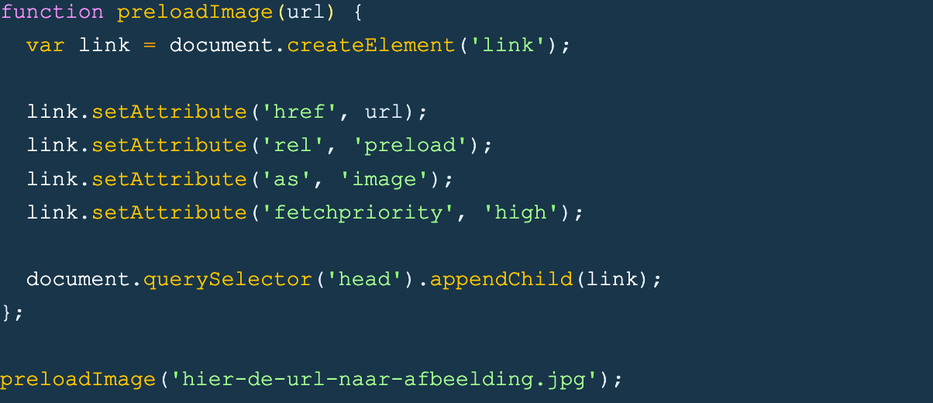
To avoid this, you can use the following script at the beginning of your code to “preload” the image as early as possible. This means that the browser starts loading the image immediately, even before it is actually called in the code.
... Just a quick note: we send out a newsletter every three weeks that includes the latest blogs, team updates and, of course, news about the offerings in our academy. Click here to subscribe.
At server-side testing the modifications are made on the server-side of the site and immediately forwarded to the visitor. This means that the new variant can be seen immediately without the need for a script to make adjustments to it. With this, the flicker effect is nonexistent.
However, implementation of server-side testing is a lot trickier, and this often requires developers to help implement each test.
Thus, the Flicker effect causes the test results of your A/B test to become less reliable. This is something you want to avoid. Placing the script as high up in the code as possible, preloading large assest or using server-side testing can reduce the chances of a flicker effect. Should you want to know more about A/B testing or want help with this? Get in touch with us!
 Nederlands Nederlands
 English