March 5, 2026
Why experimentation is becoming an operating model for smart organizations
A conversation with Valentin Radu, founder of Omniconvert, on experimentation as an operating model, AI and sustainable digital growth. Read more

We are looking for new colleagues! Check out our vacancies.

Usually, writing a test in an A/B testing tool is fairly straightforward. You write a JavaScript snippet or jQuery in the code editor, set the targeting and triggers, and the desired changes are executed as expected. However, when dealing with a Single Page Application (SPA), writing an A/B test becomes a bit trickier. This is because a Single Page Application is not a traditional website and behaves a little bit differently, which can sometimes produce confusing results.
Traditionally, the html of a Web site is built by a server and then sent entirely to the browser. The browser receives this code and renders the page on your screen. Once you click on a link to change pages then this is passed to the server and the browser returns a completely new page. The disadvantage of the traditional method is that with every click all content is downloaded again, even what doesn't really need to be replaced at all. Dynamic fields such as forms are deleted again, unless this is solved in the code in another way.
A Single Page Application (SPA) works a little differently. In an SPA, the site is built entirely with JavaScript and it is not the server, but the browser that builds the page. The browser receives an empty page from the server along with a package of JavaScript and data and then builds the page itself. When the user then clicks on a link, no new page is loaded, but the browser is sent only the new content from the server and replaces it in the browser itself and adjusts the url if necessary.
Elements that do not need to be replaced remain, elements that are no longer needed are removed and new elements are rendered. After the first load, there is no need to load an entire page each time, only the pieces of content that are needed. This ensures better performance and a more dynamic website because existing data remains.
Unfortunately, this alternative behavior of a Single Page Application also brings a number of drawbacks, including when writing A/B tests.
Indeed, we regularly run into the following challenges:
Fortunately, there are a number of things we can do to work around the above problems.
Adjust the triggering of the tool
First, we modify the trigger in the tool. By default, tools trigger on every page load, but in this case we need to use a different option:
The best choice is an activation event because it allows you to trigger the test very specifically when you want it, but this often requires some additional development help.
On activation on url change, the tool “listens” to the url change and then triggers the test. This approximates the triggering of a traditional Web site and therefore will be used most often. Continuous triggering is somewhat less convenient to use because it triggers the test repeatedly. This can sometimes be necessary, but in this case we need to build a protection that prevents the changes from being applied multiple times.
Wait for the existence of the element to run the test
If the element we want to modify does not yet exist then we can use a piece of code that waits until the element is present and only then runs the code.
Add the following code to the beginning of your test: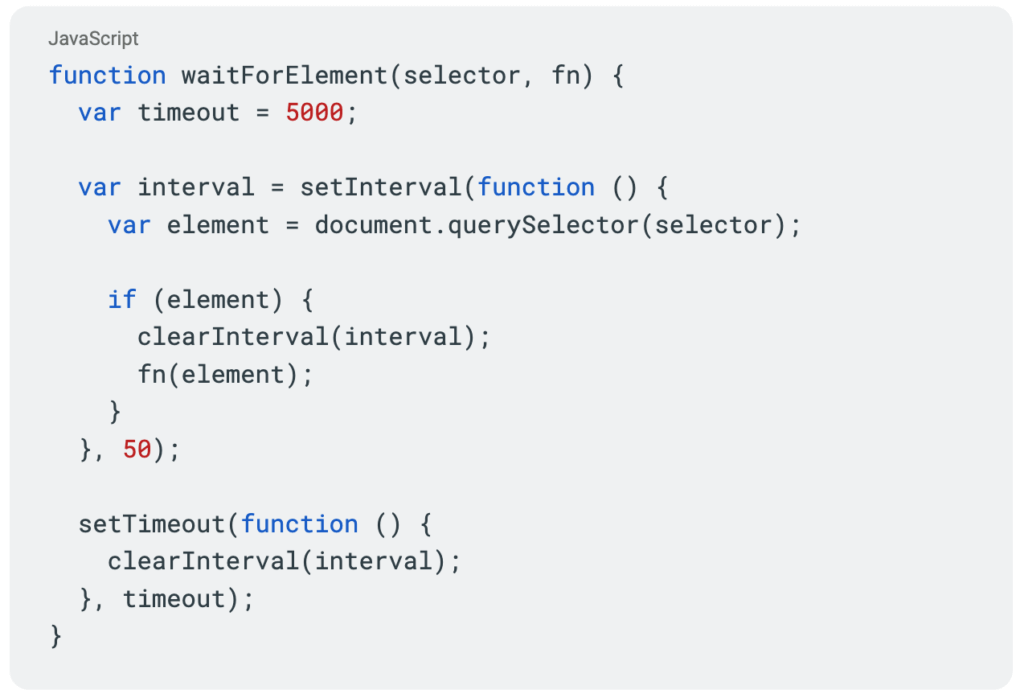
Then we can use them as follows:
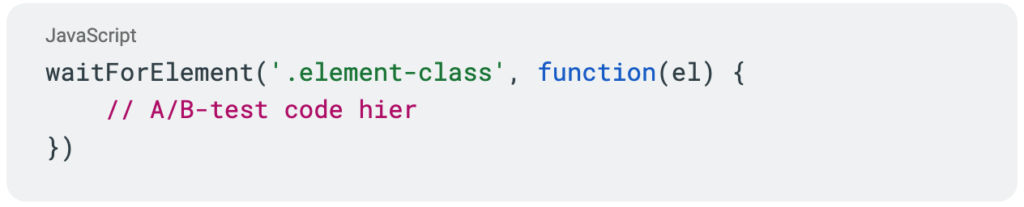
Once the waitForElement function has found the element, the code is executed within the code block.
Use a class and if statement to see if code changes have already been applied
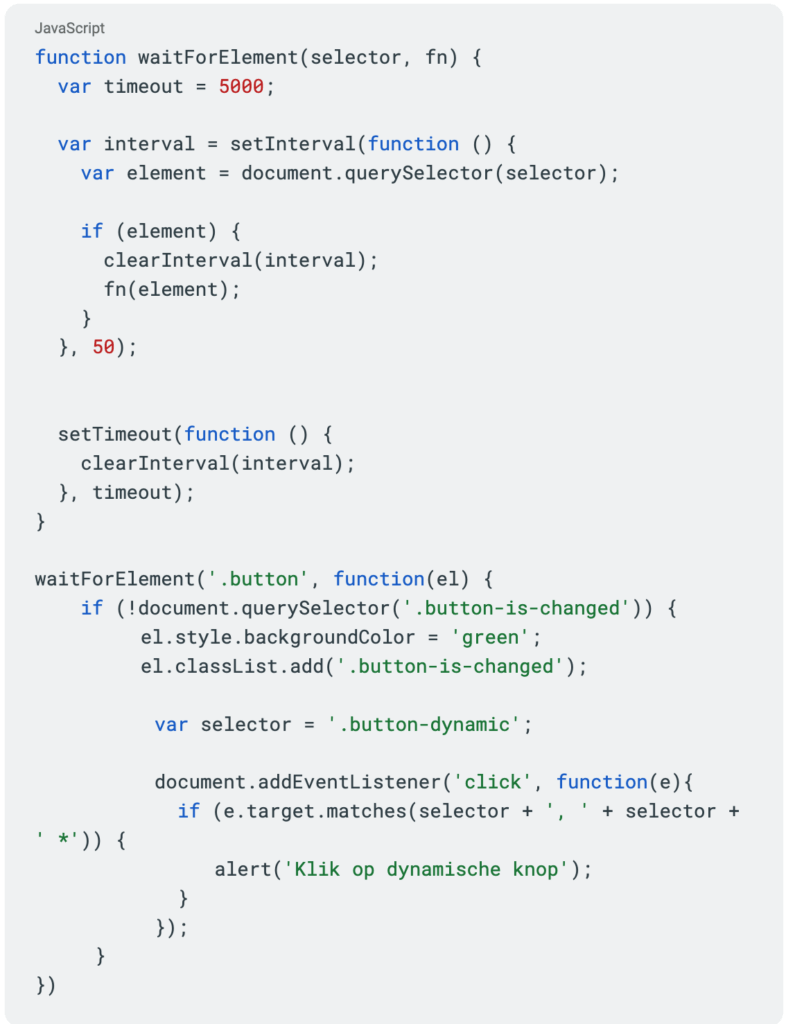
Once the test is executed, it is recommended to add a class to the element that has been modified. With this class we can check each time the test is triggered if the code has already been executed. We do this by using an if statement around our code in which we check if an element with that class exists.

Here we check:
Tracking a click event on a nonexistent element
In case we want to place an event listener on an element that does not exist at the time the test is triggered, there is a good workaround for this:

In this code, we put a click event listener on the whole page and check for each click if the clicked element matches the css selector ‘.button-dynamic’ or an element within it.
By using this code, an element can be removed and re-added without losing functionality.
The final code
Putting these solutions together, we get the result below as the basis for our A/B testing code for an SPA:
... Just a quick note: we send out a newsletter every three weeks that includes the latest blogs, team updates and, of course, news about the offerings in our academy. Click here to subscribe.
Now you also have the opportunity to enjoy A/B testing on a Single Page Application! Do you have questions about A/B testing on a Single Page Application or want to know more about our work? Then please contact.
 Nederlands Nederlands
 English